What an app is made of
An app is one signed file with one manifest. This page is the reference half of the story: what the manifest can contain, which part of App Studio edits each section, which contract introduced it, what limits apply, and what an administrator decides on top of what the app declares.
What an app is
An app is a signed package, a single file ending in .gfpkg, installed into one workspace. Everything the app adds is written down in its manifest, app.json, so an administrator can read what a package will do before installing it. Nothing an app does is undeclared, and a manifest field groupforce does not know is an error, not something that is quietly ignored.
Apps are installed per workspace. Two workspaces can run different versions of the same app, with different settings and different records.
There are two ways to produce the package and they produce the same thing. In App Studio you edit the manifest through parts (Data, Views, Processes and so on) and App Studio writes app.json and the view sources for you. In code you write app.json and the files it names yourself and build the package with gfpkg. In the table below each section says both: the App Studio part that edits it, and the key in app.json.
What an app can contain
The first column is the key in app.json. The third column says where you change it in App Studio; where it says there is no part, the section is written in the manifest (see Your first app in code).
| Manifest section | What it adds | In App Studio, part | Contract |
|---|---|---|---|
views |
Views written in TSX, built from widgets or from model-bound blocks. Exactly one is the home view, which is what the app’s icon opens. Each view lists the record types it reads and the actions it may run. (This was called screens before the rename; the manifest key is views and a package that still says screens is refused.) |
Views | 1 (window: 3) |
components |
Reusable pieces for the app’s own views and for other apps’ views (as <app id>/<id>), and for the visual editor. Each has typed props. |
No App Studio part. Declare it in app.json. |
1 |
models |
Your own record types with typed fields. groupforce stores them and gives them an API, validation, search and a generic records browser, with no database work. Contract 3 added the rows field type and the layout hints (sections, widths, colours, list columns); contract 8 added editable_by. |
Data | 1 (layout, rows: 3) |
workflows |
Shown as processes in App Studio. A state machine on one model: which steps exist, who may take each, what each sets, who is told. Declared, not scripted. Contract 3 added the timeline steps; contract 7 added rules on a step. |
Processes (who may act: also Roles & access) | 1 (steps: 3, rules: 7) |
automations |
“When X happens, if Y, do Z” rules on the app’s own models, You build them in App Studio; plain model automations need no contract version of their own. Automations on work items need subscriptions (contract 8). See Processes, roles and automations. |
Automations (the read-only library of what they can do: Actions) | none of its own |
server |
A JavaScript module with custom endpoints (routes), hooks on record events (hooks) and, from contract 8, the names of the handlers code may arm as timers (timers). Needs a signing certificate that may ship server code. |
Server code (the module, routes and hooks; no timers editor was found: name timers in app.json) |
1 (timers: 8) |
extensions |
A component placed into a named place of a built-in screen, such as the contact card. The places are a fixed list. | No App Studio part. Declare it in app.json. |
1 |
styles |
CSS that applies to the app’s own views and nothing else. | No App Studio part. | 1 |
permissions |
The most the app may read, write and run: read, write and actions. Views, extensions and server code cannot go beyond it. |
Not edited by hand: App Studio adds to it from what the views read and run (shown in the view editor’s status line, under Permissions, and on the Overview under What it may do). | 1 |
subscriptions |
The events of the platform’s own work items and projects an app asks to hear (created, updated, deleted), so a hook can be named work_item.updated. Declaring it is a request: what the app actually receives is what an administrator granted (see below). |
No App Studio part. | 8 |
statuses |
Extra statuses for work items or projects, each with a category and a colour. | No App Studio part. | 2 |
settings |
Choices each workspace makes for itself, such as which group is accounting. Types: group, user, text. | Settings | 4 |
editors |
Office editors offered to Documents. | No App Studio part. | 5 |
printTemplates |
ODT print templates for the records of the app’s models. | Printing | 6 |
custom_fields |
Names, types and formats of the app’s own keys on work items, so a person never reads a raw key in a work item’s history. | No App Studio part. | 8 |
The identity fields (format, id, name, version, description, icon, publisher) and requires.groupforce are set when you make the app and publish it. The app id is reverse-DNS (com.larkspur.client-sign-off) and must lie within a namespace the signing certificate holds.
Ids of views, components, models, processes, editors and print templates are local ids: lowercase letters, digits and hyphens, starting with a letter, at most 40 characters, unique per kind. Field, prop and setting keys use lowercase letters, digits and underscores.
Contracts
The contract number is the version of the extension contract that introduced a section. An app states the lowest version it needs in requires.groupforce, and groupforce refuses a package that needs a higher one: the message reads “needs contract N; this groupforce offers 8”. Using a feature with a lower declared contract is also an error. This groupforce offers contract 8.
| Contract | What it added |
|---|---|
1 |
The base: views, components, models, workflows, server, extensions, styles, permissions. |
2 |
statuses. |
3 |
The rows field type, layout hints (sections, widths, colours, list columns), a view’s default window size, timeline steps on a process. |
4 |
settings and the setting:<key> selector. |
5 |
editors, office editors for Documents. |
6 |
printTemplates. |
7 |
The model-bound blocks a view is built from, and rules on a process step. |
8 |
subscriptions (events of work items and projects), server.timers, editable_by on models, custom_fields. |
App Studio raises requires.groupforce as you add things it edits; the example app of these guides, Client Sign-off, declares 8 because it uses a server module with a timer.
Limits
App Studio and gfpkg build report a breach before anything is installed.
| What | Limit |
|---|---|
| Apps installed in one workspace | 50 |
| Apps being built in one workspace (drafts) | 50, at most 200 files each, 1 MiB per file |
| The package file | 50 MB |
| One file, unpacked | 20 MB |
| All files, unpacked | 100 MB |
| Entries in a package | 2000; names are clean relative paths of at most 200 characters, unique ignoring case |
| Fields per model | 1 to 100 |
| Sections per model, list columns | 20; at most 4 list columns |
A rows field |
1 to 12 columns; most rows up to 200 (20 if not set) |
| A text field, a long text field | 500 and 100 000 characters |
| Steps (timeline) per process, rules per step | 12; 20 |
| Automations per app; conditions and actions in one | 50; 20 and 20 |
| Statuses; editors; print templates; custom field names | 20; 4; 30; 100 |
| Records and actions of one extension | 20 each |
| Timers an app may arm | delay from one minute to 90 days; at most 500 waiting per app; payload at most 4 KiB; timer handler names in the manifest: at most 20 |
| Work-item changes made by app code in one run | 50 |
Certificates expire. A package is checked against the current time when it is installed or updated, so one signed with a certificate that has since expired is refused (an app that is already installed keeps running), and long-lived apps are re-signed. Signing is covered in Keys, certificates & signing.
Plans: installing an app is open to every plan. Building and publishing apps needs the Pro or Business plan, and App Studio is an add-on on Pro and included in Business. Prices are in the pricing guide; this guide only says what is enforced (Your first app in App Studio).
What an app cannot do
An app cannot invent places to plug into. The places an extension may add to are a fixed list in the platform (ExtensionPoints): the contact card (contact.detail.section), the work item sidebar (work_item.sidebar.panel), the comment box’s canned responses (work_item.composer.responses), the new work item dialog (work_item.form.section), inbox.record.detail for records of the app’s own models, and the built-in inbox viewers (inbox.<type>.detail). A manifest that names any other point is refused. The list and what each point hands to the component is in Extension points.
An app cannot replace a built-in screen. An extension is drawn under a heading the app chose, with the caption “Added by” and the app’s name; it adds to what a built-in screen shows and never replaces it.
Server code cannot go beyond the manifest. It reaches the app’s own record types, people and groups, notifications and the workspace’s settings for that app. Work items and projects are different: server code reaches them only when the manifest names them in permissions and an administrator has chosen how far (next section). Details: Server code & sandboxing.
Permissions and what an administrator chooses
Two different people say two different things about reach. The app declares what it needs: the permissions block (read, write, actions), plus, per view, the record types it reads and the actions it runs. In App Studio you do not type these: the view editor derives them from the blocks you place and shows them in its status line (“Reads … May run …”), and the Overview lists them under What it may do.
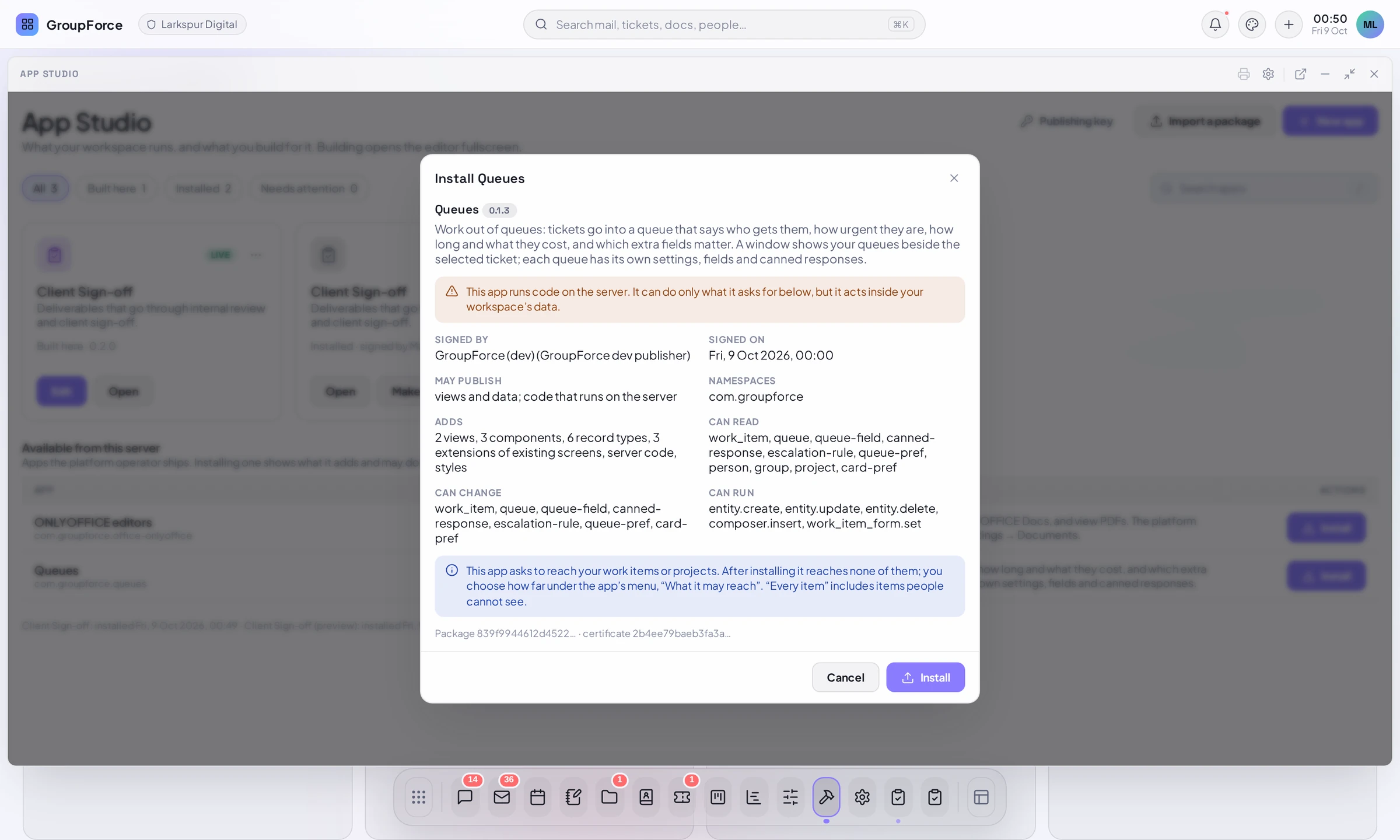
The administrator decides what is granted. For the app’s own record types the install dialog shows Can read, Can change and Can run, and the administrator decides who in the workspace may use each record type.
Work items and projects: What it may reach
Naming work_item or project in permissions.read or permissions.write is only a request. Until an administrator chooses, the app reaches none of them. The install dialog says so: “This app asks to reach your work items or projects. After installing it reaches none of them; you choose how far under the app’s menu, ‘What it may reach’. ‘Every item’ includes items people cannot see.”
To choose, an administrator opens Workspace settings, then Apps, then the app’s menu, and picks What it may reach: work items, projects. The entry is shown only for an app whose manifest asks. The dialog is titled “What <app> may reach” and has, for work items and for projects, one choice for reading and one for changing:
| Choice | Meaning |
|---|---|
| Nothing | The default. |
| Only the items of chosen projects | You tick the projects, and optionally “Work items that belong to no project” (“Projects that belong to no project” for projects). At least one choice is needed. |
| Every item in the workspace | A warning says the app can then read or change every work item, “including the ones people cannot see (an app is not a person)”; for changing it adds that the changes are recorded under the app’s name. |
- The change choice is offered only when the app asked to change; otherwise the dialog says “The app did not ask to change work items.” A grant never exceeds the request.
- The records are protected where they live: groupforce enforces the choice on every request the app makes. Reading reaches what either right reaches; writing only what the change choice reached.
- A change takes effect on the next request. Each change is recorded, and uninstalling the app removes its grants: a reinstalled app starts with nothing.
- An app listed as unreached shows “has not been allowed to reach work items or projects yet” and a Fix button that opens this dialog.
An app’s views still act as the person using them and are never wider than that person. The choice above is about what the app’s own code and automations may do with work items and projects.