Server code & sandboxing
Server code lets an app add custom endpoints, react to changes of its own records and of the workspace's work items, run something later, and veto or follow process steps. This page says what each of those places hands your function, what gf offers, which limits it runs under and where it runs, and how App Studio and a preview treat it.
What server code is for
Server code lets an app add custom endpoints, react to changes of its own records and of the workspace's work items, run something later, and veto or follow process steps. This page covers what each of those places hands your function, what gf offers, what limits it runs under and where it runs, then how the Studio and a preview treat it. If you have not written an app in code yet, start with Your first app in code.
Most of an app needs no server code: models, views, processes, rules and automations are declared and groupforce runs them. Server code covers what a declaration cannot say, such as a rule about other records or a small answer computed from many. It is one JavaScript module, at most 1 MiB, declared in the manifest. Each entry point is a function (input, gf) => result at the top level of the file, and there are five ways to reach one.
| Use | Declared as | What happens |
|---|---|---|
Custom endpoint |
server.routes: method, path, handler |
A request to /v1/tenants/<tenant id>/apps/<app id>/x/<path> runs the handler. It may return any JSON, or an object with status and body to choose the HTTP status. The body is at most 256 KiB and not sent for GET or DELETE. |
Hook |
server.hooks: on, handler |
Runs after a record of one of the app's own models is created, updated or deleted (model.<model id>.created, .updated, .deleted), or after a work item, project or work-item comment the app subscribed to changed (work_item.updated and so on; see Work items, events and timers). A change of tags fires no hook. |
Workflow guard and after |
guard and after on a transition |
The guard runs before a step is saved and can refuse it, with a message per field. The after handler runs once the step is saved; if it fails, the failure is only logged and the step stands. |
Timer |
server.timers: the handler names |
Runs once, later, when code armed it with gf.timers.set. |
Automation action |
call in an automation's do |
Runs a handler like a hook, as the app. |
A manifest that declares a route and a hook looks like this (the Client Sign-off manifest, with the timer handler it also declares). Hooks on model.<id>.* must name a model of the same manifest.
  "server": {
    "hooks": [
      {
        "on": "model.deliverable.updated",
        "handler": "onChange"
      }
    ],
    "module": "server/index.js",
    "routes": [
      {
        "path": "/stats",
        "method": "GET",
        "handler": "stats"
      }
    ],
    "timers": [
      "remind"
    ]
  },
What a handler receives and returns
Every handler gets one JSON object and the frozen gf. What is in the object depends on who called it. What comes back is JSON too; undefined becomes null.
A guard on a step
The guard runs before the step is saved and sees the record twice: record.data is the state before the step, proposed is the data after it (the new state, the comment and anything the step sets already applied). The step's own rules have been checked by then, so a guard is for what a rule cannot say.
{
  transition: { id, label, to },
  actor:      { id, roles, groups },
  comment,                                  // the step's comment, "" if none
  record:     { id, state, title, data },   // data = the record BEFORE the step
  proposed                                  // the data AFTER the step
}
It answers {} to let the step through, or refuses it:
{ deny: "message", field: "client" }          // 422, the message under that field
{ deny: "message", all: [{ field, message }, …] }   // more than one field at once
{ patch: { key: value }, notify: [{ to, title, body }] }   // adjust the data, ask for an extra notice
field names the field the refusal is about, so the view can mark it; the person sees the 422 with fields. A patch may not change a field the process manages (the state, who is responsible, the comment). If the guard itself fails, the step answers 502 with "the app's own check could not run". Client Sign-off's guard, which answers {} or a refusal:
function checkSend(input, gf) {
  // A guard is given the record as it is now (`record`) and the data it would have after the step (`proposed`).
  var client = (input.proposed || {}).client
  if (!client) return {}
  var page = gf.records.list('deliverable', { filter: { client: client, status: WAITING }, limit: 50 })
  var others = ((page && page.records) || []).filter(function (x) { return x.id !== input.record.id })
  if (others.length >= LIMIT) {
    return { deny: 'This client already has ' + others.length + ' deliverables waiting for sign-off. Finish those first.', field: 'client' }
  }
  return {}
}
The after handler gets the same object once the step is saved (record.data still the data before, proposed the data as saved); its return value is ignored.
A route
{
  method, path,                             // path as called, for example "/stats"
  params,                                   // the {parts} of a route path, such as { id: "..." }
  query,                                    // { name: "first value" }
  body,                                     // the JSON body, or null (never for GET and DELETE)
  actor: { id, roles, groups }
}
The handler runs as the person who called. Client Sign-off's route answers how many deliverables are in each state:
function stats(input, gf) {
  var counts = {}
  var page = gf.records.list('deliverable', { limit: 200 })
  var rows = (page && page.records) || []
  for (var i = 0; i < rows.length; i++) {
    var s = rows[i].data.status || 'Draft'
    counts[s] = (counts[s] || 0) + 1
  }
  return { total: rows.length, byState: counts }
}
In the preview this answered {"total":6,"byState":{"Client review":5,"Approved":1}}. A handler that throws, or is missing, answers 500; a call that runs over its time answers 504.
A hook on one of the app's own models
{
  event,                                    // "model.deliverable.updated"
  record,                                   // the record after the change, as the API returns it
  before,                                   // its data before the change
  actor: { id }                             // who made the change
}
Client Sign-off's hook looks at the record after every change and arms or cancels a timer:
function onChange(input, gf) {
  var rec = input.record
  if (!rec) return
  var key = 'remind:' + rec.id
  if (rec.data.status === WAITING) {
    gf.timers.set(key, '2d', 'remind', { id: rec.id })
  } else {
    gf.timers.cancel(key)
  }
}
A hook on a work item, project or comment
{
  event,                                    // "work_item.updated"
  record,                                   // the work item as groupforce describes it to this app
  diff, version,                            // what changed, and the version of the item
  actor: { id }                             // an account id, or "app:<other app's id>"
}
For a work item record is the item as groupforce describes it; for a deleted work item it is only {id, urn, deleted: true}; for a project {id, urn, title, deleted}; for a comment {id, urn, work_item_id, channel_id, author_id, parent_id, body, deleted, work_item}. Everything about subscriptions, scope and exactly-once delivery is on Work items, events and timers.
A timer
{ key, payload, due_at, fired_at }
key and payload are what the timer was armed with; due_at is when it was due and fired_at when it ran.
An automation's call
call in an automation runs a handler with event: "automation.<automation id>", automation, trigger, record, before (for a model) or diff (for a work item or comment) and actor.
Who the code runs as
For an endpoint, a guard or an after handler, the code runs as the person who made the request. Its record reads and writes go through the same checks as the records API, with that person's roles and groups, and the model must also be listed in permissions.read or write. Code cannot do what the API would refuse.
A hook, a timer or an automation's call has no person behind it, so it runs as the app itself: an administrator's reach over the app's own models, still limited to the manifest's permissions. Records a hook creates or changes do not trigger further hooks. A hook runs in the background after the change is saved, and a failure is only logged. Its changes to work items are made as the synthetic actor app:<app id> inside the scope the administrator granted, nothing wider. A notification sent from code that has no person is sent as the app itself.
What code can reach: the narrow door
The code runs with no ambient authority. There is no network, no file system, no environment and no setTimeout: use gf.now() for the time and gf.timers to run something later. The only way out is the frozen gf object. This is the full list; a granted scope or a manifest entry is what lets a call through, never the code itself.
| Call | What it does | What it needs |
|---|---|---|
gf.records.get / list / create / update / remove / transition |
Records of the app's own models, if permissions.read or write names the model and the person (or the app) may use it. list(model, {filter, q, sort, limit, offset}) answers {records, total}. |
Manifest permissions |
gf.workitems.get / list / update |
The workspace's own work items, inside the scope an administrator granted. list filters by custom field (cf), update takes expected_version. Page Work items, events and timers. |
Needs work_item in permissions and a scope granted by an administrator |
gf.timers.set / cancel / get |
Run one of the app's timer handlers later. set(key, after, handler, payload), cancel(key), get(key). |
Needs server.timers in the manifest (contract 8) |
gf.hours.add(start, minutes, {zone, days, from, to}) |
The moment, as an RFC 3339 time, when that many working minutes after start have passed in a calendar of an IANA zone, the days of the week (1 Monday to 7 Sunday, default 12345) and a working day HH:MM to HH:MM. |
None |
gf.notify(to, title, body, record, workItem) |
Tell people of the workspace: to is an account id or a list. record opens one of the app's own records, workItem opens a work item. At most 20 in one run, each recipient counting as one. |
workItem needs work_item in permissions.read |
gf.people.get / list / me |
People of the workspace (get answers {id, name, active}, list the active ones), and the current person with roles and groups. |
None |
gf.groups.byName / members / mine |
Look up groups and their members, and the current person's groups. | None |
gf.settings() |
The values the administrator chose in the app's settings, by key (null when not set). |
Manifest settings |
gf.now() |
The current time, RFC 3339. | None |
console.log and friends are captured into a log of at most 8 KiB per run, which is written to the server log as one line. Code cannot read contacts or any other built-in record type, call other services or the internet, or see another workspace. Of the platform's own records it can reach work items (through gf.workitems, within the scope an administrator chose) and hear of work items, projects and work-item comments (through subscriptions).
Limits
| Limit | Value |
|---|---|
Time per call |
3 seconds. On an endpoint a call that takes longer answers 504; a guard that does answers 502. |
Memory |
32 MiB heap |
Input / output |
512 KiB in, 256 KiB out |
Host calls per run |
200 calls to gf |
Notifications per run |
20 (each recipient counts) |
Changes to work items per run |
50 |
Calls at once |
8 calls run at once. Further calls wait for a slot and fail with 429 if none frees up in time. |
Module size |
1 MiB |
Failure in your code |
On an endpoint an exception or a missing handler answers 500. A guard that fails answers 502; an after handler's failure is only logged. |
Every call starts a fresh JavaScript runtime. Nothing is kept between calls, so keep state in records (or in a work item's custom fields).
Where the code runs: two runtimes
groupforce has two ways to run server code. Both use the same interpreter, QuickJS compiled to WebAssembly, the same limits and the same gf checks. They differ in where that interpreter lives.
| In-process | Engine container | |
|---|---|---|
Where |
Inside groupforce itself, in a WebAssembly sandbox. | A separate container for each workspace and app, started by groupforce on demand. |
Isolation |
The interpreter has no ambient authority, but it lives in the same process that reaches workspace data. | The container has no network, a read-only file system, all Linux capabilities dropped, a non-root user, memory, CPU and process limits, and one mount: a socket directory, read-only. Its only way out is that socket. |
How gf works |
Direct function calls. | Each gf call is a message to groupforce over the socket, answered by the same code. |
Lifecycle |
Nothing to start. | Started on first use, by default stopped after 5 minutes idle or 1 hour of age, and stopped when the app is switched off, updated or uninstalled. |
Which one runs. Which runtime is used is a setting your operator controls for the whole installation, not a choice per company. Installations that run the container engine, such as the Docker Compose installation, run server code in engine containers; the Kubernetes deployment shipped with groupforce runs it in-process. Isolation is not a plan feature: it is the same on every plan.
For you as a publisher this means: write your code against the limits above, and do not assume a particular runtime. For you as an administrator it means the warning in the install dialog is meant seriously. A server-class app acts inside your workspace's data, within its permissions, and you should install server code only from publishers you trust.
In App Studio
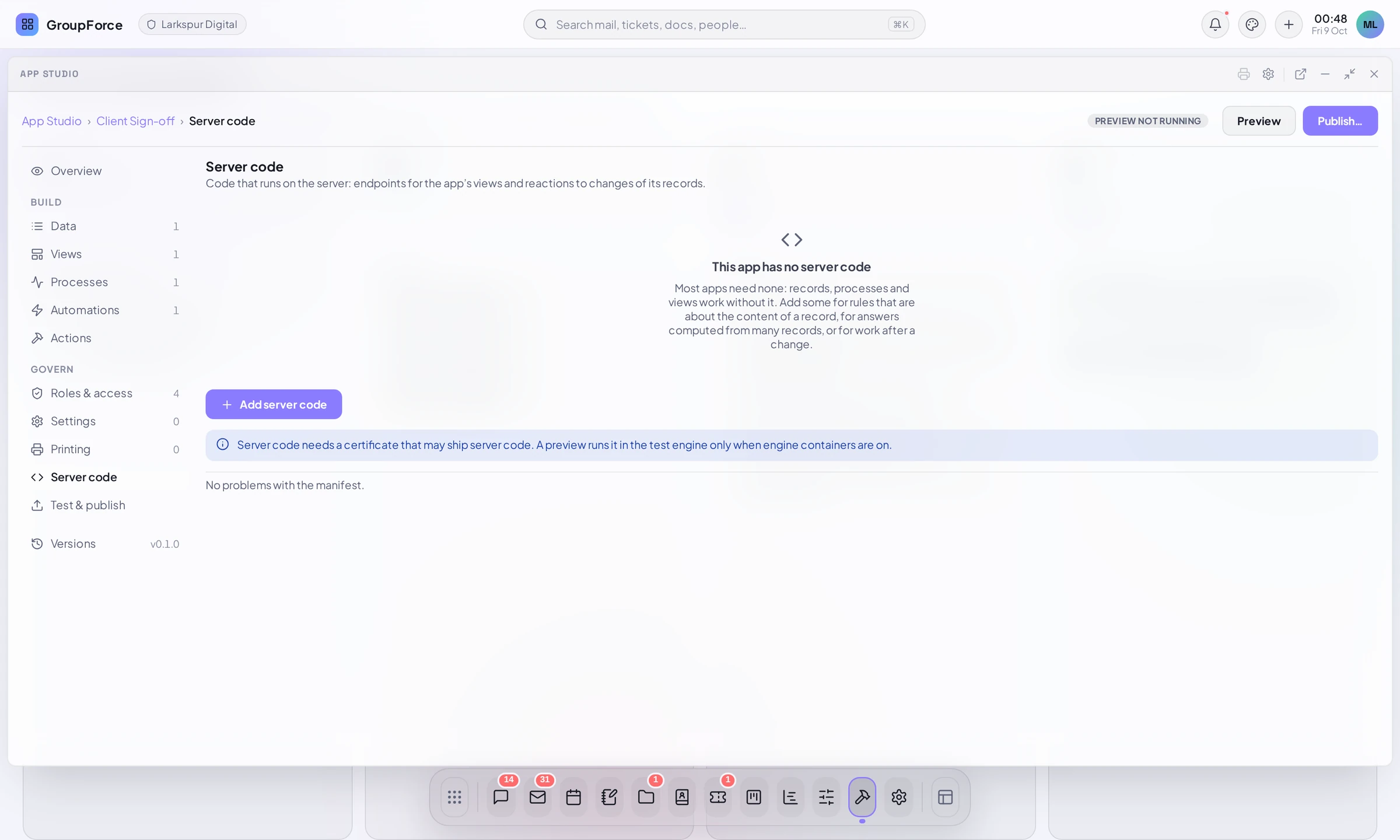
Every app has a Server code part, in the Govern group next to Roles & access, Settings, Printing and Test & publish. Without server code it says This app has no server code and explains: "Most apps need none: records, processes and views work without it. Add some for rules that are about the content of a record, for answers computed from many records, or for work after a change." Below the button Add server code a note says what it needs: "Server code needs a certificate that may ship server code. A preview runs it in the test engine only when engine containers are on."
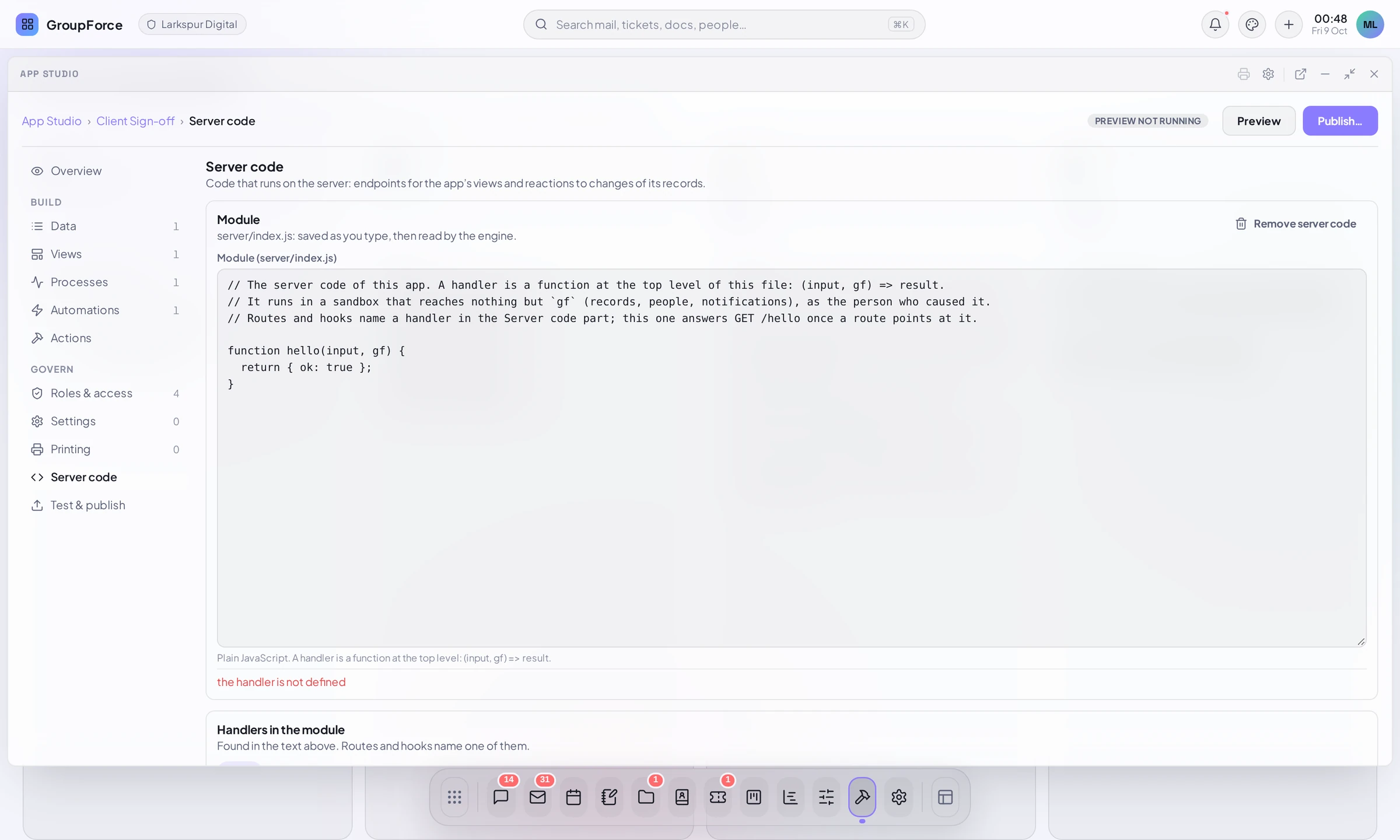
Add server code writes a starter server/index.js and declares a server section with no routes and no hooks. The part then shows the module in an editor ("server/index.js: saved as you type, then read by the engine") and says whether the engine could read it. The starter holds one handler, hello, which returns { ok: true }.
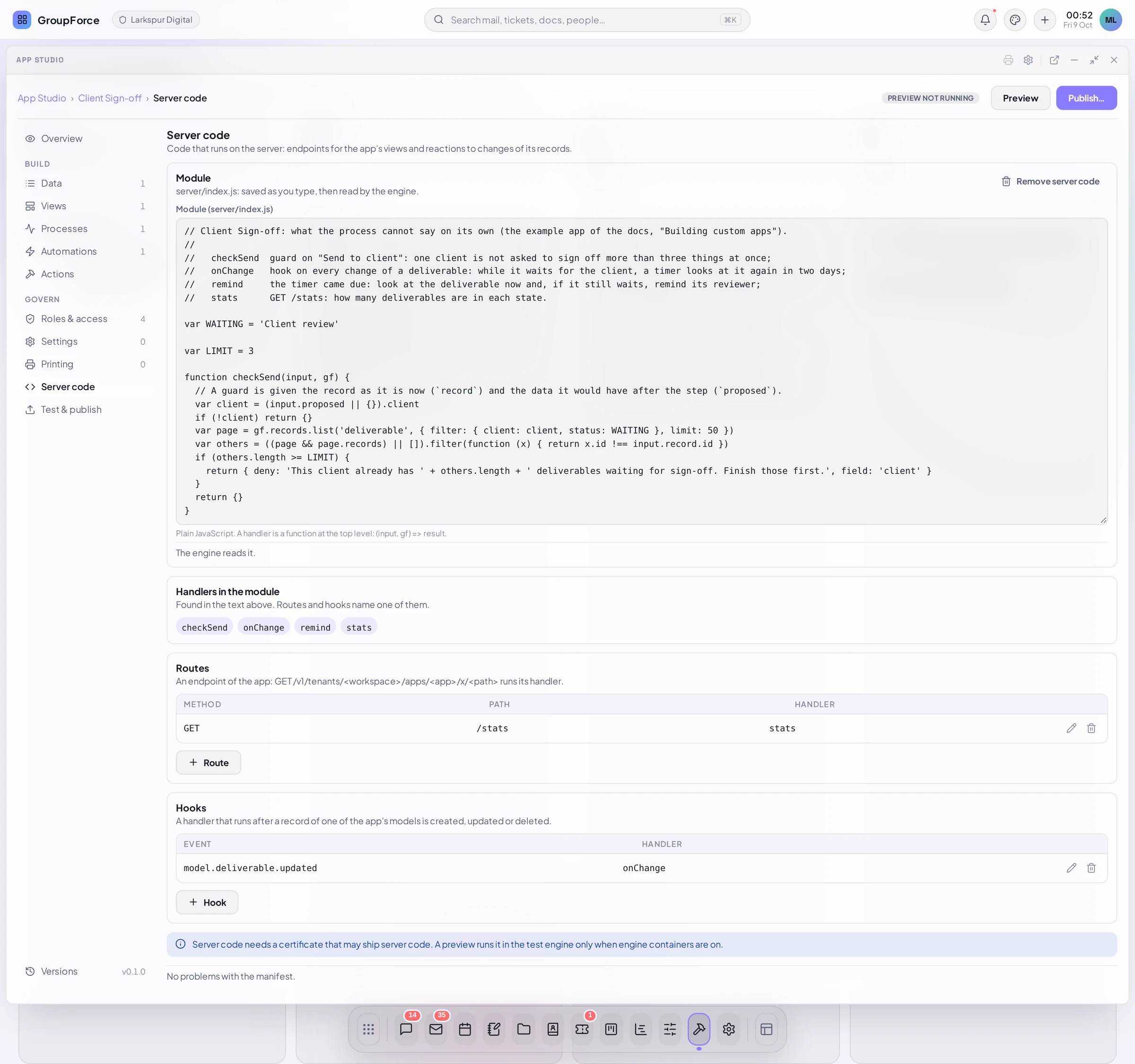
A handler is a top-level function name( declaration; the part lists the ones it finds under Handlers in the module ("Found in the text above. Routes and hooks name one of them") and offers them when you add:
- Routes: a method (GET, POST, PUT, PATCH or DELETE), a path under
/apps/<app>/xsuch as/invoices/{id}, and a handler. - Hooks: When a record of one of the app's models is created, updated or deleted, run a handler.
Guards and after handlers are chosen on a process step, not here: when the app has server code, the step editor in Processes, roles and automations gets a Server code section with Check before ("May refuse or adjust the step.") and Run after ("Runs once the step has happened."), each a handler name. Remove server code is refused while a view, a guard, an after handler or an automation's Run server code still uses it.
The part edits the module, routes and hooks on the app's own models. subscriptions and server.timers are declared in the manifest, as on Work items, events and timers.
In a preview
Start preview in Test and publish from the Studio installs the draft into the author's own preview slot with a 24-hour development certificate. Server code runs there under six rules:
- Container engine only. If the installation runs server code in-process, the preview's server code is not run: endpoints answer 503, hooks, guards and after handlers are skipped, and the Studio says why. With engine containers it runs in the test engine
- Own app id, own records. The slot has its own records, and
gf.recordscannot touch the installed app's data. Settings come from the slot. - Notifications go to the author. In a preview
gf.notifydelivers to the author's inbox only, marked as a preview ("[Preview] ..."), whatevertosays. Nothing else leaves the workspace. - Class. The development certificate covers server code only for the development verifier; it never satisfies the
serverclass of a real installation, so a preview is never publishable. - Quotas and lifetime. The preview's engine counts against the per-workspace engine quota (8) and is stopped when the certificate expires, the slot is reset or the author leaves the Studio.
- Checked at install as before. The syntax check runs in the engine, and an unreachable engine fails the preview.
A preview receives no live work-item or project events: only enabled, installed apps are delivered them.
The certificate class
A package that declares server code (a server section) needs a publisher certificate of class server, not only ui. gfpkg build refuses before it writes anything:
gfpkg: gfpkg: class: the app declares code that runs on the server, which its signer's certificate does not allow (it allows [ui])
In a real installation the server class comes from the platform operator, with the CLI or a hardware key; a key made in the browser by App Studio normally gets class ui only. Keys, certificates & signing explains the keys and the request. On a development installation the operator may switch on automatic certificates that include the server class (a development setting; it is refused in production); the Studio screenshots in these guides come from such an installation, where the Keys page shows "ui, server" and a request is signed the moment it arrives. Do not rely on that outside development.
What happens at install
When an administrator installs a package with server code, groupforce loads the module in the runtime that will run it and checks that every handler named in the manifest is a function. A package whose code cannot be checked, for example because no runtime can be reached, is refused. An app is never installed on code nobody has looked at. Updating, switching off or uninstalling an app stops its running engine, so the next call uses the new module.
Revoking a publisher's certificate stops new installs and updates. It does not stop an app that is already installed. To stop one, an administrator switches it off or uninstalls it.
The install review, and the administrator's choice of what the app may reach, are on Installing and updating apps.