Your first app in code
This walkthrough takes the Client Sign-off app of the Studio guides and shows it as what it is underneath: a folder with a manifest, a view and a server module, built into a signed .gfpkg with the gfpkg tool, verified, and installed. Write the files by hand and the result is the same package the Studio makes.
The folder
This page builds the same app as Your first app in App Studio: Client Sign-off, a deliverable that goes through internal review and client sign-off before it is delivered. The Studio wrote these files; this is the same app as code. Three files make the package, and the manifest is the only one that is required:
client-sign-off/
  app.json                  the manifest: models, process, automation, server section, permissions
  views/deliverables.tsx    the home view (7 KB, no handlers)
  server/index.js           the server code: checkSend, onChange, remind, stats
An app can also have components/*.tsx (small pieces other views or extension points use), *.css styles, print/*.odt templates and an icon file; What an app is made of lists every section. gfpkg build puts every regular file under the folder into the package, so keep the folder clean.
The manifest
Everything the app adds is declared in app.json, so an administrator can read what a package will do before installing it. Here are the parts that matter, quoted from the file the Studio exported (the full file is 319 lines; the Studio writes the keys of each object in its own order). First the identity and the contract:
{
  "id": "com.larkspur.client-sign-off",
  "icon": "clipboard-check",
  "name": "Client Sign-off",
  …
  "version": "0.2.0",
  "requires": {
    "groupforce": 8
  },
requires.groupforce is the extension contract the app needs. This groupforce offers contract 8. Client Sign-off declares 8 because its server.timers section needs it. A manifest that needs a higher contract than the platform offers is refused, and so is one that uses something newer than the contract it declares. The table of contracts is on Extension points.
Models
A model is a record type of the app. Client Sign-off has one, deliverable; the client is a ref to a Contact, which is what the Studio draws as a picker. (The start of the model; its other fields are due, reviewer, status and feedback.)
  "models": [
    {
      "id": "deliverable",
      "list": {
        "sort": "due",
        "columns": [
          "status",
          "client",
          "due",
          "reviewer"
        ]
      },
      "label": "Deliverable",
      "fields": [
        {
          "key": "title",
          "type": "text",
          "label": "Title",
          "required": true
        },
        {
          "key": "client",
          "ref": "contact",
          "type": "ref",
          "label": "Client"
        },
        …
A process, with a rule and a guard
A workflows entry is the process of one model: the field that holds the state, the states, the steps (timeline bands) and the transitions a person can take. This is the step Send to client: who may take it, the rule the platform checks before any code runs, the guard that names a function in the server module, and who is told.
        {
          "by": [
            "field:reviewer",
            "role:admin"
          ],
          "id": "send",
          "to": "Client review",
          "from": [
            "Internal review"
          ],
          "guard": "checkSend",
          "label": "Send to client",
          "rules": [
            {
              "id": "due-ahead",
              "check": "due >= today",
              "field": "due",
              "message": "The due date is already past."
            }
          ],
          "notify": [
            {
              "who": "creator",
              "body": "{actor} sent it for client review.",
              "kind": "info",
              "title": "{title} is with the client"
            }
          ]
        },
An automation
An automation is "when X happens, do Z", declared in the manifest and run by groupforce for events on the app's own models. This one tells the group Client Services when the step send is taken:
  "automations": [
    {
      "do": [
        {
          "who": "group:Client Services",
          "body": "{actor} sent it for review. Client: {field:client}, due {field:due}.",
          "kind": "info",
          "title": "{title} is with the client",
          "action": "notify"
        }
      ],
      "id": "tell-client-services",
      "on": {
        "step": "send",
        "event": "transition",
        "model": "deliverable"
      },
      "title": "Tell Client Services when a deliverable goes to the client"
    }
  ],
Server code and permissions
  "server": {
    "hooks": [
      {
        "on": "model.deliverable.updated",
        "handler": "onChange"
      }
    ],
    "module": "server/index.js",
    "routes": [
      {
        "path": "/stats",
        "method": "GET",
        "handler": "stats"
      }
    ],
    "timers": [
      "remind"
    ]
  },
  "permissions": {
    "read": [
      "deliverable",
      "person",
      "group",
      "contact"
    ],
    "write": [
      "deliverable",
      "contact"
    ],
    "actions": [
      "entity.create",
      "entity.update",
      "entity.transition",
      "entity.delete"
    ]
  }
| Part | What it declares | Page |
|---|---|---|
models |
The app's own record types and their fields, list columns, who sees which records. | Data, views and the visual editor |
workflows |
A process on a model: states, steps, who may take each transition, rules, notifications, and the names of a guard and an after handler. | Processes, roles and automations |
automations |
Rules that react to a change of the app's own records (or, with an entity trigger, to a work item or comment the app subscribed to). | Processes, roles and automations |
server |
The module, its routes, its hooks and the handlers that timers may run (timers, contract 8). |
Server code & sandboxing |
views |
Each view: its source file, which one is home, and the actions and records it may ask to use. |
Data, views and the visual editor |
permissions |
The most the app may read, write and do. A view or extension that asks for more is refused when the package is installed; server code that reaches for more is refused at the call. | What an app is made of |
requires |
groupforce: the lowest contract that covers everything the manifest uses. Declare that number and no higher. |
Extension points |
Unknown fields are errors (the parser rejects them), so a typo does not silently do nothing. gfpkg build checks the manifest against the file list and reports every problem at once.
The view
The view views/deliverables.tsx was generated by New view, The pages of Deliverable (no code). It is a tree of data-only blocks that read the model and the process: ModelWorkspace holds two ModelPages (show="list" and show="record"), the list uses ListTable, the record page FormField, RecordSteps and DecisionButtons. It has no handlers: no setState, no onClick. The first lines:
import { Component } from 'react'
import { Stack, Divider, EmptyState, Grid, Heading, Row, Section, Spacer, Text, ModelWorkspace, ModelPage, Show, ListSummary, AddRecord, ListTabs, ListSearch, ListDensity, ListChips, ListError, ListTable, ListRange, ListPager, RecordLeave, RecordCrumbs, ReadOnlyNote, RecordTitle, RecordSteps, RecordMessages, RecordWaiting, RecordFacts, RecordCreator, RecordHistory, FormField, RecordDelete, RecordStep, RecordSave, RecordStatusText, DecisionHint, DecisionComment, DecisionButtons, ClosedText } from '@groupforce/widgets'

export default class Deliverables extends Component<{}, any> {
  render() {
    return (
      <ModelWorkspace model="deliverable">
        <ModelPage show="list">
A view is a class that extends Component, built only from the widgets of @groupforce/widgets (no raw page elements, style or className), and it can ask for only the actions and records its manifest entry lists. What a view may import is fixed by the SDK list; groupforce refuses a view that imports anything else when the package is installed.
A hand-written view
When the blocks are not enough, write the class yourself: subscribe to records, keep state, call actions. The example app Hello, deals that ships with groupforce (examples/apps/hello) is the smallest of these. Its imports and the state it keeps:
import { Component } from 'react'
import { Stack, Row, Heading, Text, Table, TextField, Select, Button, Notice } from '@groupforce/widgets'
import { actions } from '@groupforce/actions'
import { data } from '@groupforce/data'
import { component } from '@groupforce/components'

// One of this app's own components (declared in app.json under this view's "components"): ./ means this app's.
const StageBadge = component('./stage-badge')

interface State {
  contacts: any[]
  contactsStatus: string
  deals: any[]
  dealsStatus: string
  title: string
  amount: string
  stage: string
  problem: string
}

// The home view of the example app. It reads contacts and this app's own Deal model (both declared in app.json; `app:deal` is the
// app's model, not another app's), adds a deal through the same entity actions a built-in screen uses, and gets its look from
…
and the part of render() that draws the list (the whole view is 85 lines):
  render() {
    const { contacts, deals } = this.state
…
Every example app is validated and its views compiled against the SDK; copy one and change it rather than starting from nothing. The larger ones (examples/apps/queues, examples/apps/bestellschein) show forms, steps and tables at real size.
The server code
The module server/index.js holds what the process cannot say on its own. Its four handlers are all named in the manifest: checkSend (the guard on Send to client), onChange (a hook on model.deliverable.updated), remind (a timer) and stats (the route GET /stats). This is the guard, verbatim:
function checkSend(input, gf) {
  // A guard is given the record as it is now (`record`) and the data it would have after the step (`proposed`).
  var client = (input.proposed || {}).client
  if (!client) return {}
  var page = gf.records.list('deliverable', { filter: { client: client, status: WAITING }, limit: 50 })
  var others = ((page && page.records) || []).filter(function (x) { return x.id !== input.record.id })
  if (others.length >= LIMIT) {
    return { deny: 'This client already has ' + others.length + ' deliverables waiting for sign-off. Finish those first.', field: 'client' }
  }
  return {}
}
What each handler is given and returns, which gf calls exist and the limits they run under are on Server code & sandboxing. The two that use time, onChange and remind, are explained on Work items, events and timers.
Build, verify and install
A package is signed with a publisher certificate for the namespace the app id lives in (here com.larkspur) and the right class: ui for an app without server code, server for one that has any. In production the certificate comes from the platform operator (see Keys, certificates & signing). To try the whole path without one, make a throwaway authority and publisher with the same tool. The commands below were run with the gfpkg binary on a copy of the example; nothing touched a running installation. File paths are as typed.
$ gfpkg ca init --dir ca --name "Larkspur Test Root" --org "Larkspur Digital"
authority "Larkspur Test Root" written to ca (valid until 2036-10-08). Keep ca/key.pem offline.

$ gfpkg ca issue --ca ca --out publisher --cn "Larkspur release" --org "Larkspur Digital" --ns com.larkspur --class server --days 365
certificate for "Larkspur release" (com.larkspur, may ship server) written to publisher, valid until 2027-10-08
Now build, verify and inspect. --root on build also runs the server's whole verification (chain, expiry, digests) on the result before writing it; verify does the same on a package you were given; inspect trusts nothing and only says what the package claims.
$ gfpkg build --dir client-sign-off --cert publisher/cert.pem --key publisher/key.pem --root ca/cert.pem -o client-sign-off-0.2.0.gfpkg
com.larkspur.client-sign-off 0.2.0 signed by "Larkspur release" → client-sign-off-0.2.0.gfpkg (3 files, 5721 bytes)

$ gfpkg verify --root ca/cert.pem client-sign-off-0.2.0.gfpkg
OK  com.larkspur.client-sign-off 0.2.0 — Client Sign-off
    signed by "Larkspur release" (Larkspur Digital) on 2026-10-08 22:12Z; certificate 79102524bb0c4af3… valid until 2027-10-08
    may ship: [server]; namespaces: com.larkspur
    package sha256 3faa2f5ca0a96a89e2e8a45c0182e617e14794617334d3968c0e3da111b3f76b
    contains: 1 views, 0 components, 1 models, 1 workflows, 0 extensions, server code (1 routes, 1 hooks)
    files: app.json, server/index.js, views/deliverables.tsx

$ gfpkg inspect client-sign-off-0.2.0.gfpkg
com.larkspur.client-sign-off 0.2.0 — Client Sign-off (NOT VERIFIED)
needs classes: server; declares 1 views, 0 components, 1 models, 1 workflows, 0 extensions
permissions: read [deliverable person group contact], write [deliverable contact], actions [entity.create entity.update entity.transition entity.delete]
signature entry present (832 bytes); run gfpkg verify to check it
gfpkg build refuses before it writes anything. Two refusals you will meet, the first when the app id is outside the certificate's namespace, the second when the app has server code but the certificate may ship only ui:
$ gfpkg build --dir wrong/client-sign-off --cert publisher/cert.pem --key publisher/key.pem -o wrong.gfpkg
gfpkg: gfpkg: namespace: "com.other.client-sign-off" is not within a namespace the signer holds (com.larkspur)

$ gfpkg ca issue --ca ca --out uionly --cn "Larkspur ui" --org "Larkspur Digital" --ns com.larkspur --class ui --days 365
certificate for "Larkspur ui" (com.larkspur, may ship ui) written to uionly, valid until 2027-10-08
$ gfpkg build --dir client-sign-off --cert uionly/cert.pem --key uionly/key.pem -o ui.gfpkg
gfpkg: gfpkg: class: the app declares code that runs on the server, which its signer's certificate does not allow (it allows [ui])
Everything above uses a throwaway authority. A workspace trusts only the authority its operator configured, so a package signed by ca/cert.pem here would not install on a real workspace. Production has its own authority and never uses these files.
Install
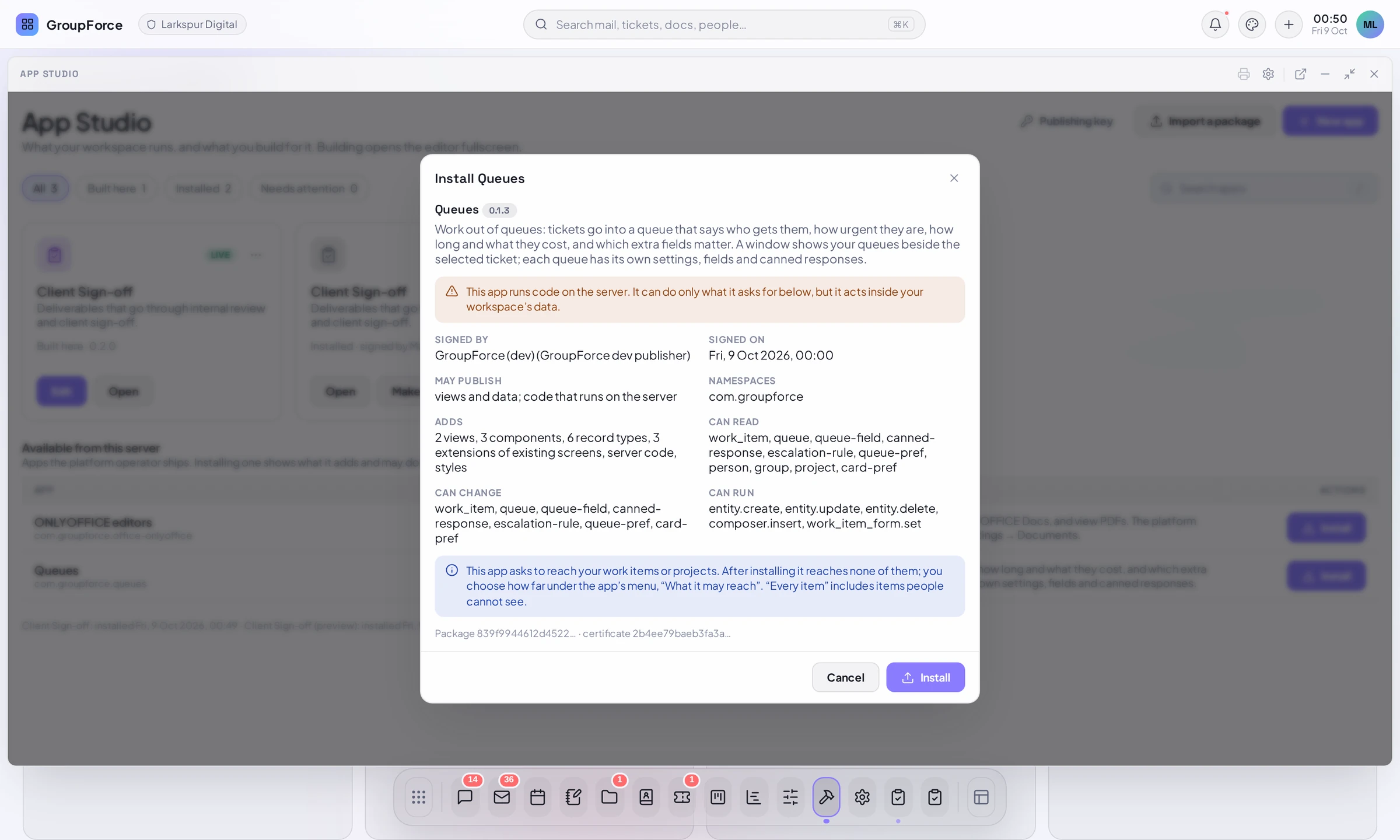
Open App Studio (Workspace settings, Apps) and choose Import a package, then pick the .gfpkg file. Before anything runs you see the install review: Signed by, Signed on, May publish, Namespaces, Adds, Can read, Can change, Can run, a warning for server code, and the package and certificate fingerprints. Choose Install. Installing and updating apps covers the review, updates, and what an administrator decides afterwards (for example what an app may reach of the workspace's work items).
How the two paths meet
Both paths produce the same thing: a signed package with one manifest. The Studio does not have a private format.
- Studio to code. Publishing from the Studio with Where set to Signed package file gives you a
.gfpkg(a ZIP) with the files shown above; see Test and publish from the Studio. Unzip it to read the same files. - Code to Studio. Install the package, then use Make a copy to edit on the installed app. An installed, signed app is never edited in place; the copy becomes an app built here and opens in the Studio with its parts (Data, Views, Processes and so on).
- A hand-written view opens in the visual editor. The editor offers every method of the view's class whose last
returnis a tree, not onlyrender(); whenrender()is code that chooses between parts, they are listed with a segmented control above the canvas. A change made in the editor is written back into that method'sreturnand nothing else in the file moves. Code between widgets is drawn as a marker, and a widget inside a piece of code is not selectable: open the page it lives in. The data and state of a hand-written view are not editable in the editor's panel.
Next: Server code & sandboxing for what the handlers receive and return.